Порівняння MS Excel | Zoho Analytics | MS Power BI
Сьогодні кожна компанія, велика чи мала, прагне підвищити продуктивність та забезпечити більшу цінність для своїх клієнтів. Бізнес-аналітика та аналіз даних, які є основою сучасного бізнесу, допомагають вирішити це завдання. За допомогою різноманітних інструментів прості цифри можна перетворити на цінну інформацію, яка згодом може вплинути на важливі бізнес-рішення.
У більшості організацій обробка даних, складання звітів та аналіз здійснюються за допомогою електронних таблиць, зокрема Microsoft Excel. Вони стали фактичним інструментом як для бізнес-аналізу, так і для складання звітів. Однак є сфери, в яких електронні таблиці можуть виявлятися справді обмеженими як інструмент бізнес-аналітики.
У цій статті ми розглянемо деякі підводні камені Microsoft Excel , з якими ви зіткнетеся, якщо використовуватимете цей сервіс як інструмент аналітики. Ми також наведемо детальне порівняння Microsoft Excel з Zoho Analytics та Power BI.
Основні недоліки компанії Microsoft Excel
Широкий спектр джерел даних: Кількість джерел, з яких можна отримати дані, є обмеженою. Пряма інтеграція зі сторонніми бізнес-рішеннями (CRM, Helpdesk, Finance тощо) відсутня, а це означає, що дані потрібно або вводити вручну, або конвертувати у формат файлу, який можна завантажити в Microsoft Excel.
Великі масиви даних: Бізнес-додатки генерують величезні обсяги даних, які необхідно аналізувати для прийняття обґрунтованих рішень. Однак електронні таблиці не здатні обробляти великі обсяги даних, оскільки максимальна кількість рядків у Microsoft Excel становить лише 1 048 576. Робота з великими масивами даних також супроводжується повільною швидкістю обробки запитів.
Візуальний аналіз та дослідження: Виявлення прихованих закономірностей є кінцевою метою аналізу даних. При використанні Microsoft Excel користувач повинен знати, якого кінцевого результату він хоче досягти, ще до початку аналізу. Microsoft Excel не підтримує автоматизований аналіз. Крім того, графіки є статичними. Користувач не може взаємодіяти з діаграмами, деталізувати дані або розбивати їх на складові частини. Ця модель дозволить користувачам створювати лише звіти, які допоможуть їм зрозуміти «що», а не «чому».
Широкий спектр джерел даних: Кількість джерел, з яких можна отримати дані, є обмеженою. Пряма інтеграція зі сторонніми бізнес-рішеннями (CRM, Helpdesk, Finance тощо) відсутня, а це означає, що дані потрібно або вводити вручну, або конвертувати у формат файлу, який можна завантажити в Microsoft Excel.
Великі масиви даних: Бізнес-додатки генерують величезні обсяги даних, які необхідно аналізувати для прийняття обґрунтованих рішень. Однак електронні таблиці не здатні обробляти великі обсяги даних, оскільки максимальна кількість рядків у Microsoft Excel становить лише 1 048 576. Робота з великими масивами даних також супроводжується повільною швидкістю обробки запитів.
Співпраця: Після того як дані надано, вони стають повністю доступними для особи, якій їх надано. Власник не може обмежити доступ до конкретного набору даних або конкретних звітів/інформаційних панелей. Також неможливо встановити такі права доступу, як «тільки для читання», «читання та запис» тощо. Це змушує власника створювати кілька копій однієї й тієї ж інформації, щоб надавати її різним користувачам у різний спосіб.
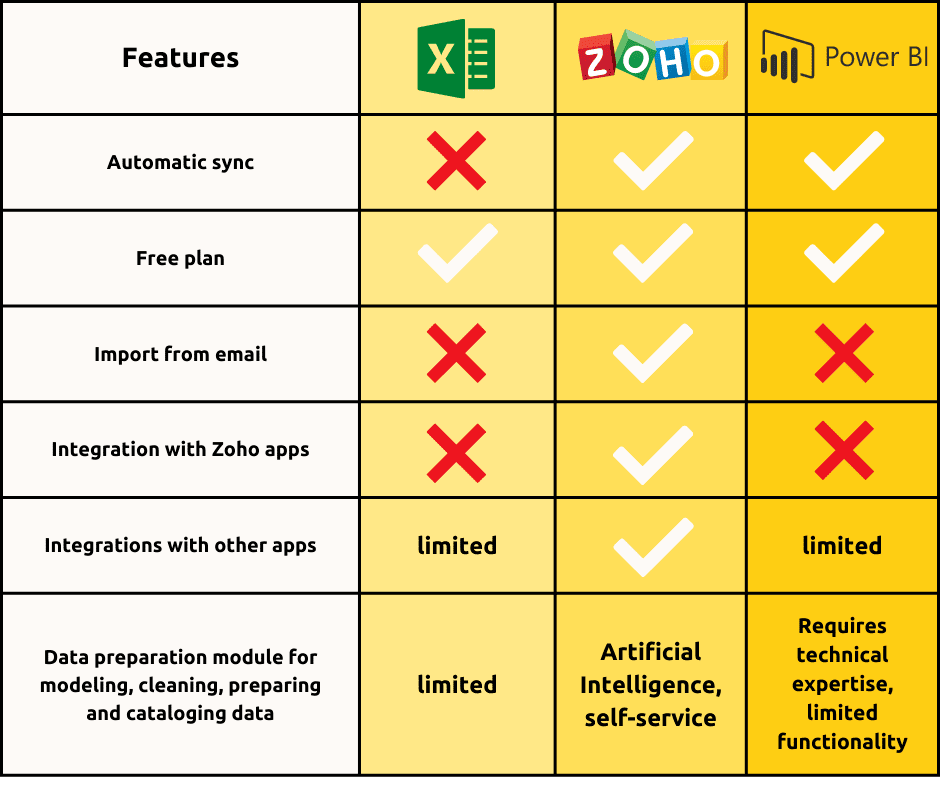
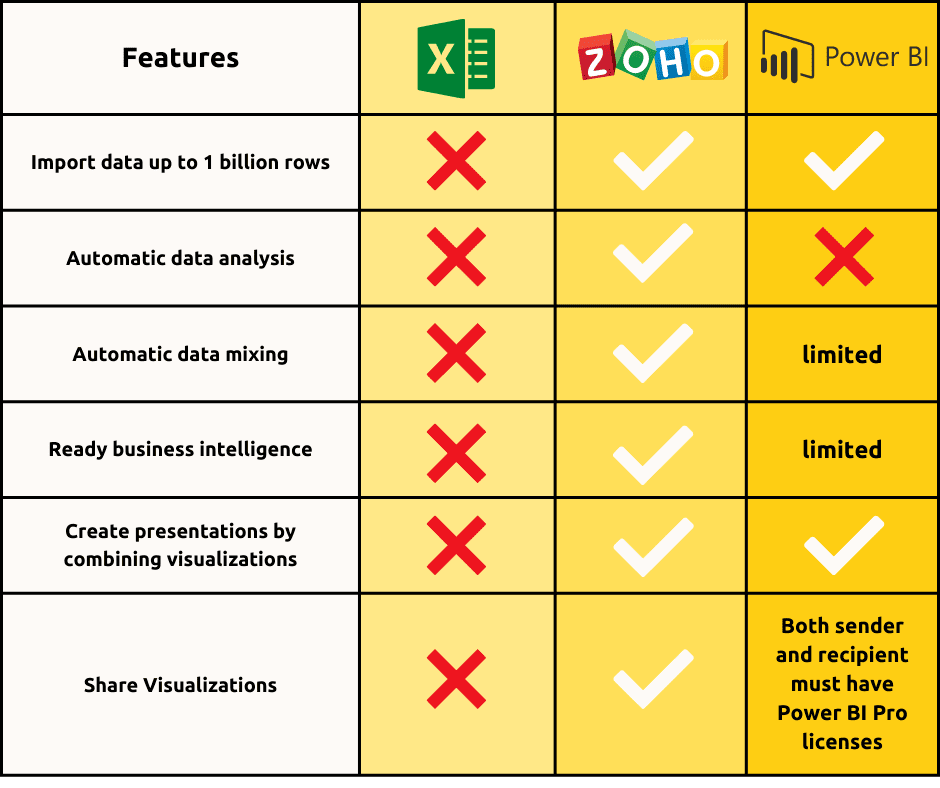
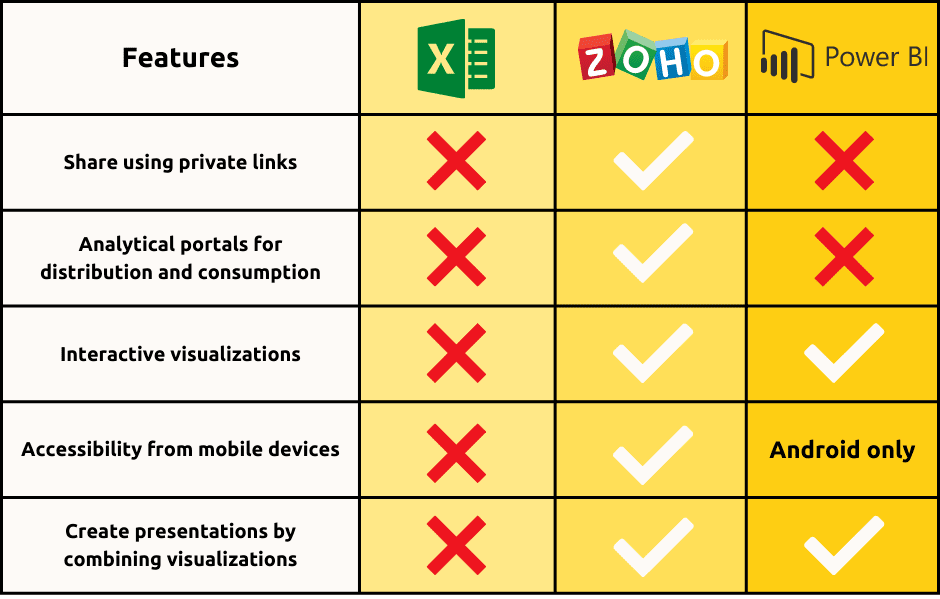
Основні переваги « Zoho Analytics » та Power BI
- Підключайтеся до різних типів джерел даних та безпосередньо інтегруйте їх з популярними бізнес-додатками.
- Обробка великих даних:Zoho Analytics а також « Power BI » швидко та легко обробляють великі обсяги даних.
- Візуальний аналіз: дає змогу візуалізувати дані, створюючи детальні звіти та інформаційні панелі за допомогою інтерфейсу « easy-to-use ».
- Обмін даними та співпраця: « Zoho Analytics » дає змогу ділитися певними звітами/інформаційними панелями з конкретними користувачами/групами. Ви можете публікувати та вбудовувати звіти/інформаційні панелі у свої блоги, веб-сайти та на сайті apps.
- Цілісність даних: всі працюють з одним і тим самим файлом, що дозволяє уникнути дублювання даних.
- Надійність та безпека: Дрібнозернистий контроль доступу дозволяє встановлювати такі права доступу, як «тільки для читання», «читання та запис» тощо, забезпечуючи безпеку ваших даних. Аналіз у будь-якому місці: Завдяки мобільному додатку ви можете отримувати доступ до своїх даних, звітів та інформаційних панелей, де б ви не були.
- Потужний механізм формул: дозволяє створювати KPIs, розраховувати бізнес-показники та проводити глибокий аналіз.
На закінчення слід зазначити, що Microsoft Excel призначений для простого аналізу. Використання цього сервісу замість інструменту бізнес-аналітики може призвести до зниження продуктивності, уповільнення термінів виконання завдань та виникнення людських помилок. Настав час перейти на потужний, повноцінний інструмент бізнес-аналітики. Вийдіть за межі можливостей Microsoft Excel, проводьте глибокий аналіз та приймайте рішення на основі даних за допомогою Zoho Analytics та Power BI.