WhatsApp Business Інтеграція з Zoho CRM: можливості для бізнесу
Майже кожен клієнт уже користується WhatsApp. Проблема полягає не в тому, щоб зв’язатися з клієнтами, а в тому, щоб впоратися з сотнями діалогів, водночас забезпечуючи точність даних у CRM .
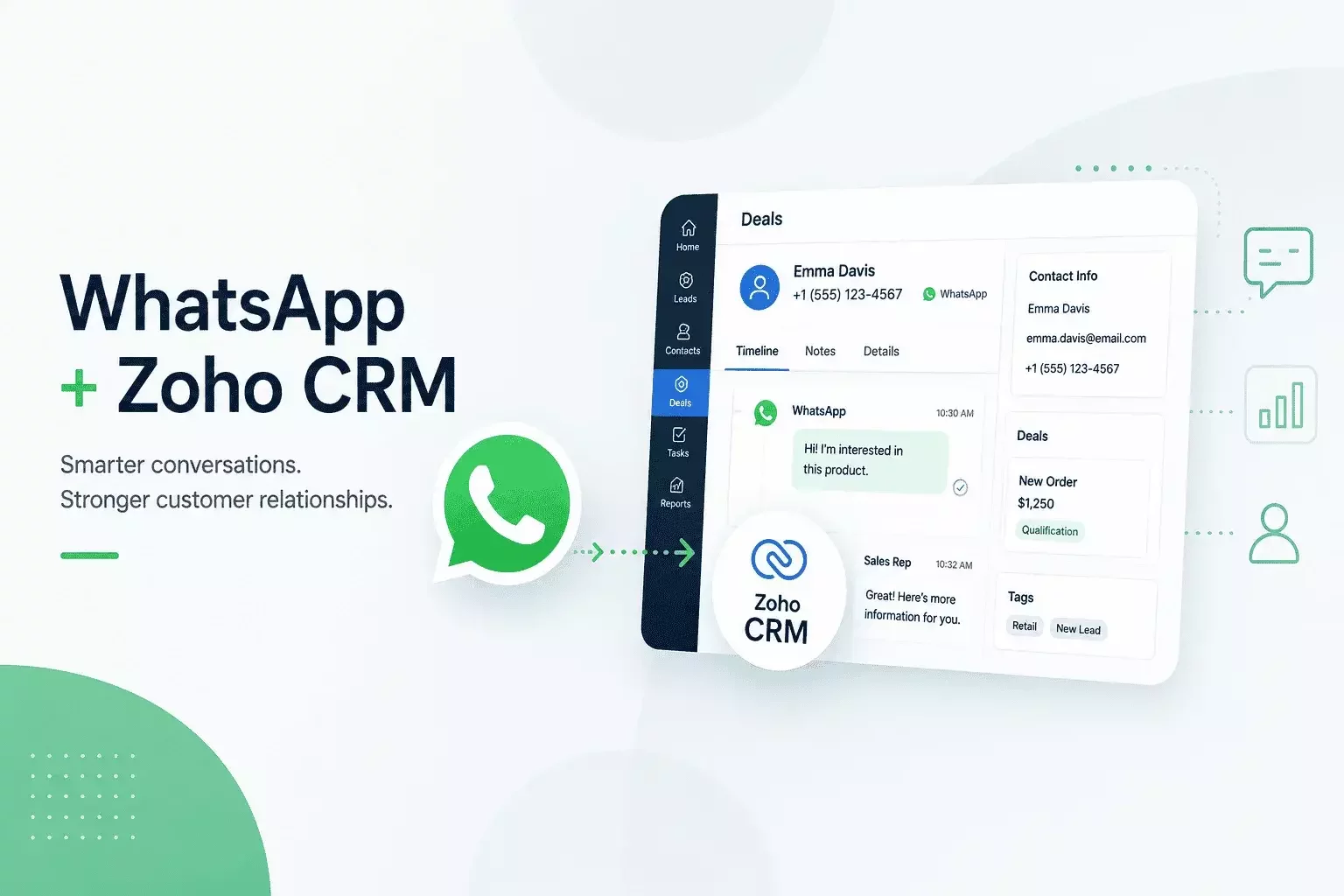
Завдяки інтеграції Zoho CRM з WhatsApp кожна розмова стає частиною вашого процесу продажів. Команди продажів можуть надсилати повідомлення, оцінювати потенційних клієнтів, автоматизувати подальшу роботу з клієнтамиups та переглядати повну історію взаємодії з клієнтом, не перемикаючись між додатками.
У компанії « CRMOZ » ми впровадили Zoho CRM для підприємств у таких галузях, як роздрібна торгівля, виробництво, охорона здоров’я, нерухомість та професійні послуги. Однією з найпопулярніших функцій автоматизації є інтеграція WhatsApp Business із Zoho CRM для забезпечення швидшої та більш персоналізованої комунікації з клієнтами.
Чому вашій компанії потрібне рішення «WhatsApp для бізнесу» CRM
Зараз клієнти, надсилаючи повідомлення бренду, очікують побачити профіль компанії, а не лише номер телефону. Обмін повідомленнями через WhatsApp business у сфері роздрібної торгівлі став основним каналом для інформування про стан замовлень, нагадувань про зустрічі та швидких запитань, і покупці рідко бажають переходити на електронну пошту чи звертатися до кол-центру, щоб отримати відповідь.
Потужність маркетингу через WhatsApp для бізнесу
Маркетинг у WhatsApp для бізнесу є ефективним, оскільки повідомлення відкриваються набагато частіше, ніж електронні листи. Згідно з даними сайту Meta, компанії, які використовують сервіс WhatsApp Business API , можуть автоматизувати спілкування з клієнтами, забезпечуючи при цьому безпеку та автентичність комунікації завдяки зареєстрованому профілю компанії.
Стимулювання продажів: повідомлення типу « WhatsApp Business » для роздрібної торгівлі
Для команд роздрібної торгівлі система обміну повідомленнями « WhatsApp business » підтримує автоматичні сповіщення про наявність товару на складі, нагадування про покинуті кошики та повідомлення про доставку, що надсилаються в режимі реального часу, не відволікаючи при цьому персонал від роботи в контакт-центрі.
⚠️ Увага: Використання особистого номера WhatsApp для ділових повідомлень може порушувати правила WhatsApp щодо комерційного використання та призвести до того, що дані клієнтів не будуть фіксуватися в системі « CRM ».
Переваги вбудованої інтеграції Zoho CRM з WhatsApp
Вбудована інтеграція Zoho crm з WhatsApp автоматично прив’язує кожне повідомлення до відповідного контакту, завдяки чому торгові представники можуть переглянути повну історію спілкування перед тим, як відповісти.
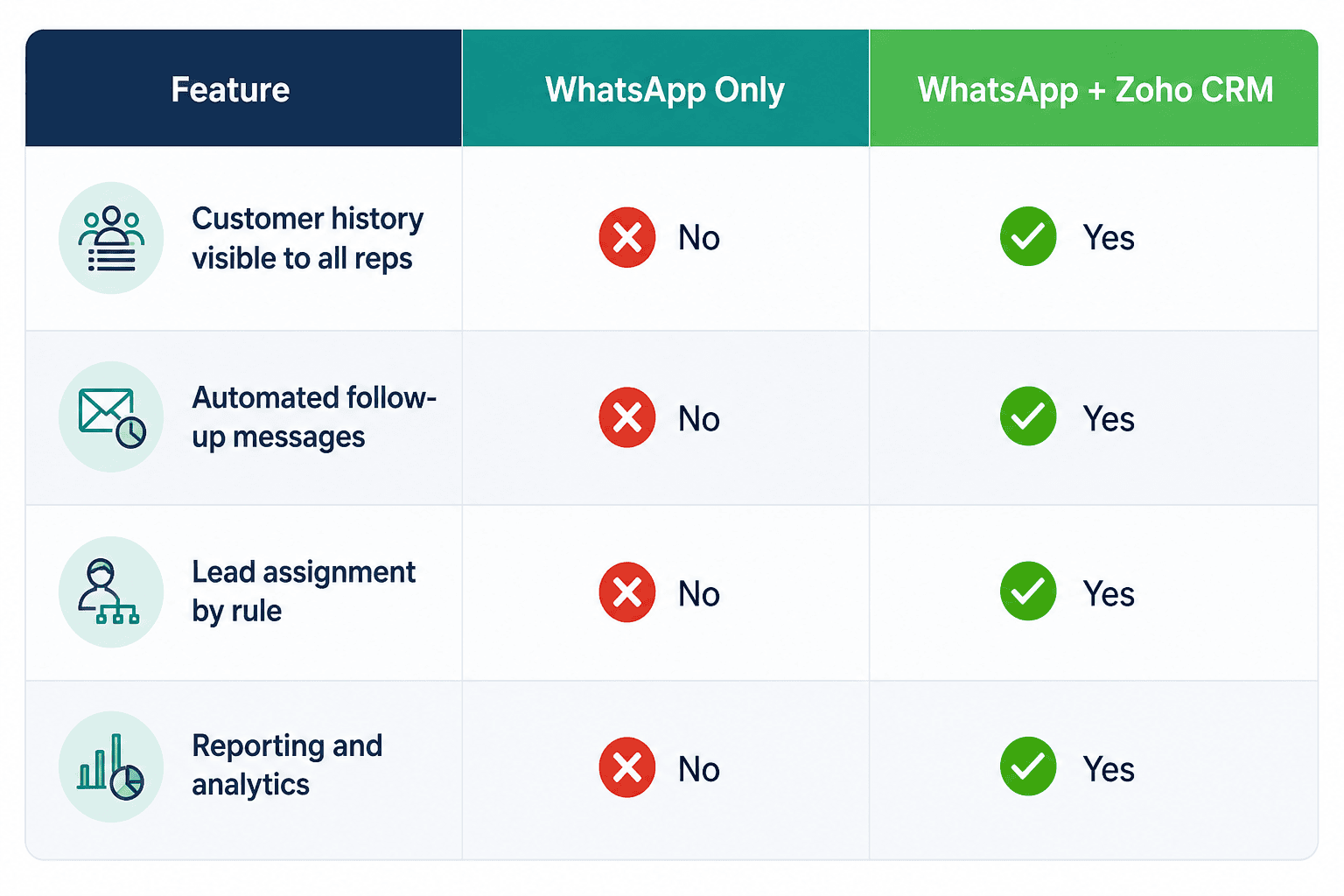
На сайті CRMOZ команди, які перейшли від спільного особистого телефону до повноцінної інтеграції Zoho з WhatsApp, як правило, скоротили середній час першої відповіді з кількох годин до менше ніж двадцяти хвилин — просто тому, що повідомлення надходять безпосередньо до відповідного співробітника, а не залишаються непрочитаними.
ℹ️ Примітка: Zoho CRM підтримує як вбудовані коннектори, так і розширення з Zoho Marketplace для WhatsApp, тож ви можете вибрати рівень автоматизації, який дійсно потрібен вашій команді — дивіться нашу інтеграцію Zoho crm інтеграції .
Як інтегрувати « WhatsApp Business » з CRM
Підготовка до інтеграції Zoho з WhatsApp
Перш ніж інтегрувати whatsapp business з crm, переконайтеся, що у вас є підтверджений обліковий запис WhatsApp Business API , активна підписка на Zoho CRM та права адміністратора до обох сервісів. Визначте, яка команда відповідає за який тип спілкування — продажі, підтримка чи білінг — до того, як почнуть надходити повідомлення.
Підключення ваших облікових записів WhatsApp, Zoho та CRM
Підключіть свій обліковий запис WhatsApp у Zoho crm через офіційний сайт Meta Cloud API або через авторизованого постачальника бізнес-рішень, прив’яжіть його в налаштуваннях каналу Zoho та протестуйте з невеликою групою користувачів, перш ніж розгортати систему в масштабах всієї компанії.
✅ Порада: Проведіть тижневий пілотний проект з однією командою, щоб виправити правила маршрутизації, перш ніж усі співробітники почнуть покладатися на з’єднання через WhatsApp для бізнесу crm .
Кращі практики управління чатами з клієнтами в Zoho
Встановіть чіткі правила розподілу відповідальності, визначте цільові показники часу відповіді та використовуйте шаблонні відповіді на повторювані запитання, щоб заощадити час, не створюючи враження, що ви відповідаєте як робот. Щомісяця переглядайте теги чату, щоб дані служби підтримки залишалися корисними для складання звітів, а не просто накопичувалися. Для команд, які прагнуть більш глибокого контролю, спеціальні інтеграції Zoho для бізнесу можуть додати процеси затвердження або власні поля, яких не підтримує стандартний коннектор.
Часті запитання
Чи складно інтегрувати WhatsApp Business з платформами CRM ?
Ні. Налаштування інтеграції Zoho CRM з WhatsApp є досить простим, якщо у вас вже є підтверджений обліковий запис WhatsApp Business API . Після підключення ви зможете автоматично синхронізувати розмови з клієнтами, розподіляти чати між відповідними членами команди та керувати всім спілкуванням безпосередньо в Zoho CRM. Співпраця з досвідченим партнером з впровадження також може пришвидшити процес розгортання та гарантувати, що інтеграція відповідатиме найкращим практикам.
Які обмеження має інтеграція WhatsApp із Zoho CRM ?
Більшість обмежень пов’язані з платформою WhatsApp Business від Meta, а не з Zoho CRM. Щоб розпочати спілкування поза 24-годинним робочим часом служби підтримки клієнтів, підприємства повинні використовувати затверджені шаблони повідомлень, а для використання деяких розширених функцій обміну повідомленнями необхідний підтверджений обліковий запис WhatsApp Business API . Однак ці вимоги допомагають забезпечити безпечне та надійне спілкування з клієнтами.
Як інтегрувати WhatsApp Business API із Zoho CRM?
Щоб інтегрувати WhatsApp Business з CRM, вам знадобиться діюча підписка на Zoho CRM , підтверджений обліковий запис WhatsApp Business API та права адміністратора на обох платформах. Після підключення через офіційний портал Meta Cloud API або через авторизованого постачальника бізнес-рішень ви зможете налаштувати маршрутизацію потенційних клієнтів, автоматизовані робочі процеси, шаблони повідомлень та синхронізацію історії клієнтів. Рекомендується протестувати інтеграцію з невеликою командою перед повним впровадженням.
Чи можна використовувати систему обміну повідомленнями « WhatsApp Business » для автоматичних сповіщень у сфері роздрібної торгівлі?
Так. Інтеграція Zoho з WhatsApp дозволяє легко автоматизувати підтвердження замовлень, повідомлення про відправлення, нагадування про зустрічі, повідомлення про покинуті кошики та супровід після покупкиups. Кожне повідомлення пов’язане з записом клієнта CRM , що забезпечує командам з продажу та підтримки повну прозорість, водночас зменшуючи обсяг ручної роботи та скорочуючи час реагування.
Потрібна індивідуальна інтеграція Zoho з « CRM » для вашого бізнесу?
Незалежно від того, чи потрібно вам підключити WhatsApp Business , ERP-програмне забезпечення, бухгалтерські платформи, системи електронної комерції чи будь-які інші бізнес-додатки, CRMOZ розробляє та впроваджує індивідуальні інтеграції Zoho CRM , адаптовані до ваших робочих процесів. Ми створюємо безпечні та масштабовані рішення, які автоматизують обмін даними, усувають ручну роботу та забезпечують взаємодію між усіма системами.WhatsApp Business, ERP-програмне забезпечення, бухгалтерські платформи, системи електронної комерції чи будь-які інші бізнес-додатки, CRMOZ розробляє та впроваджує індивідуальні інтеграції Zoho CRM , адаптовані до ваших робочих процесів. Ми створюємо безпечні та масштабовані рішення, які автоматизують обмін даними, усувають ручну працю та забезпечують взаємодію між усіма системами.
Зверніться до наших експертів з інтеграції Zoho та дізнайтеся, як індивідуальна інтеграція може оптимізувати роботу вашого бізнесу.